Water 100% Screen time today 0 min

Keep scrolling to see what doomscrolling does ↓

Coming soon to iPhone

Your screen time is a fish tank.

Doomscrolling drains the water. Putting your phone down fills it back up. Keep the water up and your little fish stays happy.

Coming soon to the App Store
  • No account needed
  • Your screen time stays on your iPhone
  • Up to 10 fish to raise

The part nobody tells you

App limits are “disgustingly easy to bypass.”

Most people have already tried the free fixes: app limits, grayscale, deleting apps. Anything with an easy way around it stops working, because your thumb opens the app before you decide to.

1“Ignore limit” is one tap away.
“App limits on iPhone. 0/10 Disgustingly easy to bypass.”
r/digitalminimalism · ▲887
2Deleting the app doesn't stick.
“I keep deleting it and redownloading it in the same day.”
r/digitalminimalism · ▲27
3It starts before you get out of bed.
“Morning phone check becomes 1-hour scroll before leaving bed”
r/nosurf · ▲310
4The hours just vanish.
“Then it takes me five minutes to eat my yogurt, but somehow, an hour has passed.”
r/digitalminimalism · ▲798

One person called app blockers a Masterlock on a pack of cigarettes. Tish the Fish keeps the lock, and adds something you won't want to break: your fish.

How it works

A number you can ignore. A fish you can't.

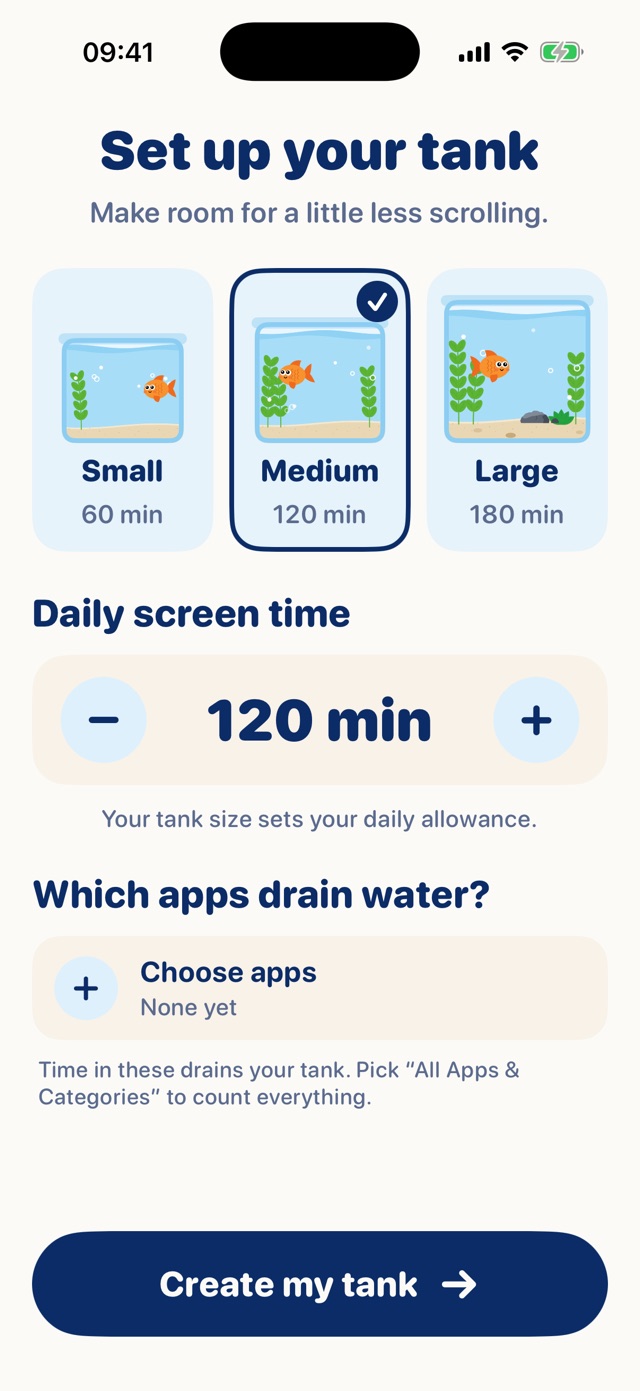
Setup screen with Small, Medium and Large tank sizes and a daily screen-time goal.
Step 1

Set up your tank

Pick your daily screen-time goal. That's a full tank. Choose which apps drain the water.

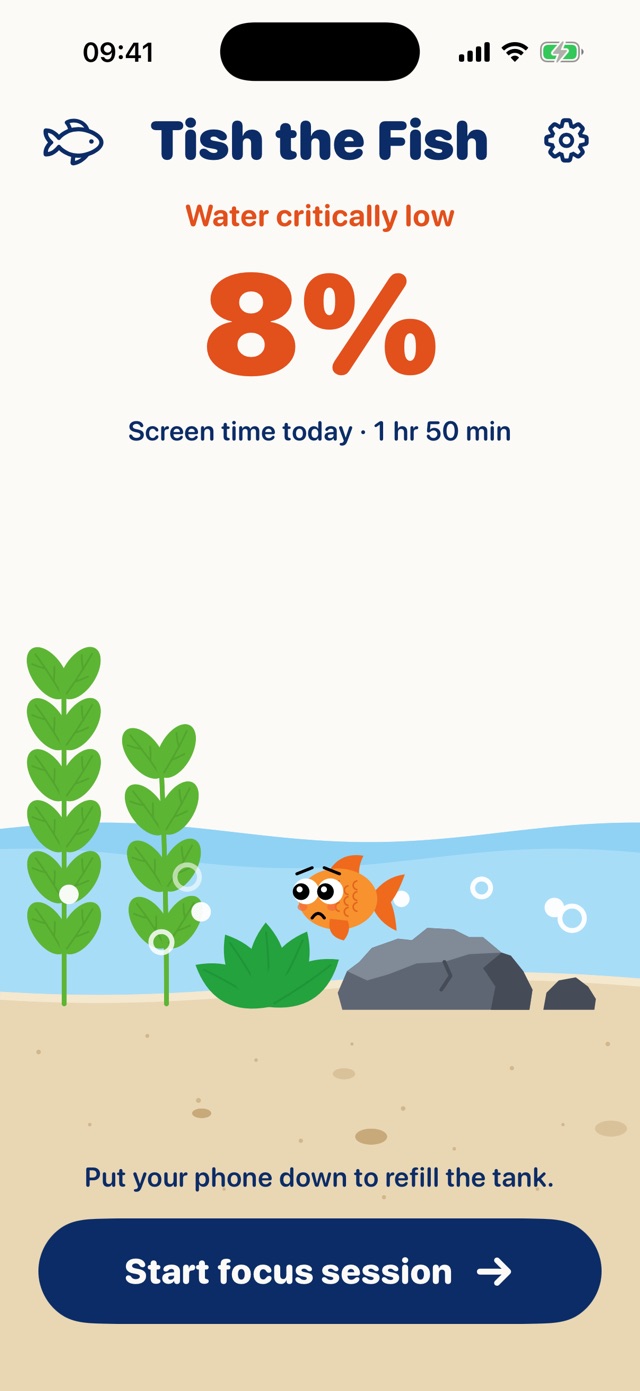
Home screen at 8% water: Water critically low, the goldfish looks worried.
Step 2

Scrolling drains it

Every minute in a drain app lowers the water. Run low and your fish starts to worry.

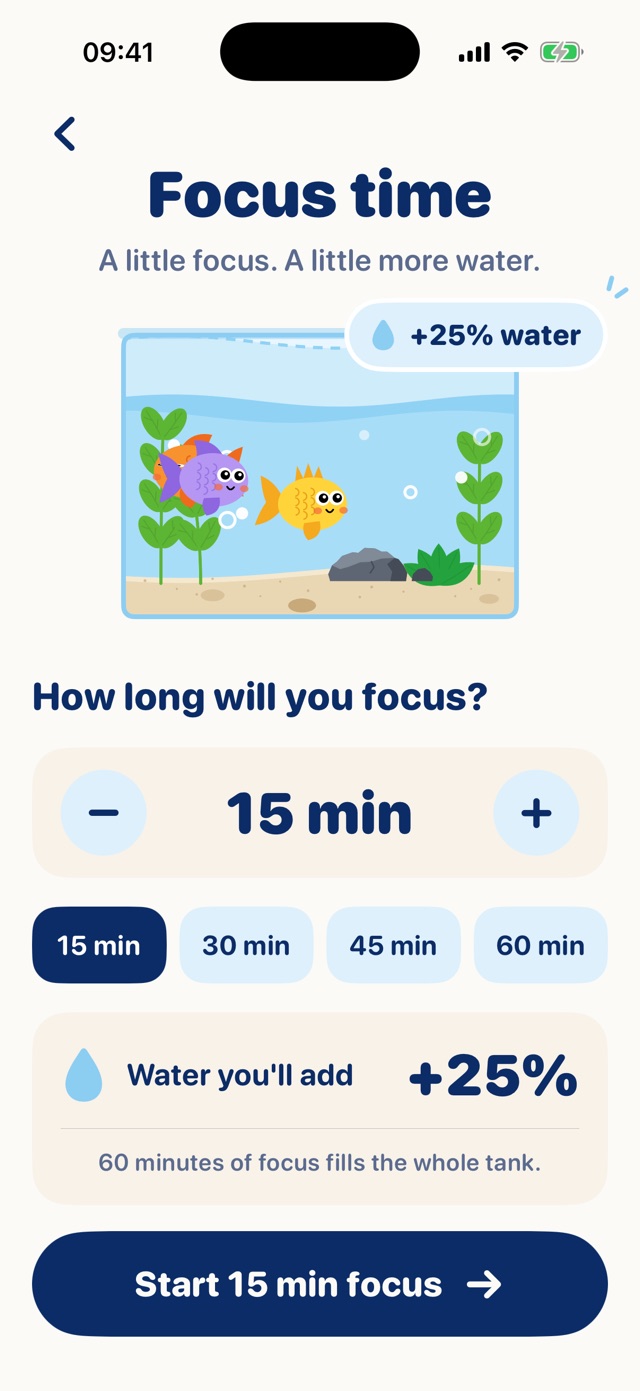
Focus time screen: pick 15 to 60 minutes and see how much water you'll add.
Step 3

Focus fills it back up

Start a focus session and put your phone down. An hour of focus fills the whole tank.

The stakes

Simple rules. Real consequences.

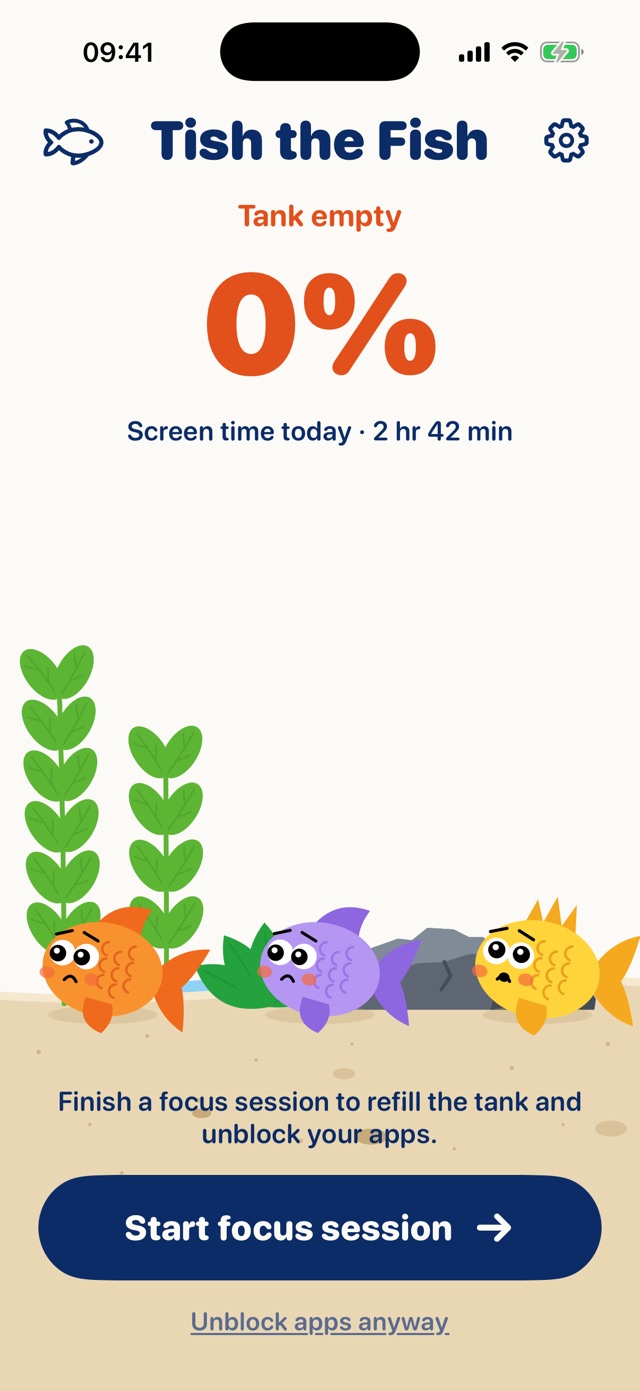
Empty tank, apps blocked

Hit 0% and your drain apps lock automatically. Your fish lie on the sand, gasping, until a focus session refills the water.

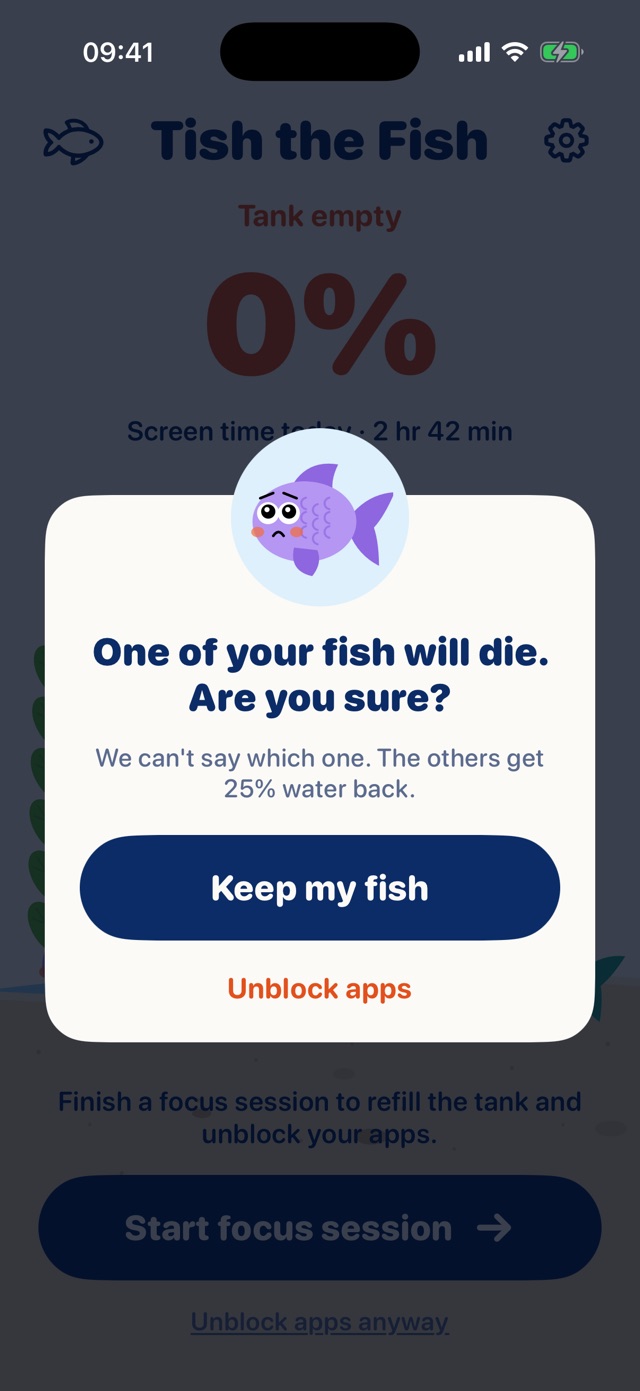
Unblock, and a fish dies

You can always override the block. It costs one of your fish, picked at random. It floats away as a little ghost with a crown.

No half credit

Water only lands when the timer ends. Open another app mid-session and you get nothing back.

The reward

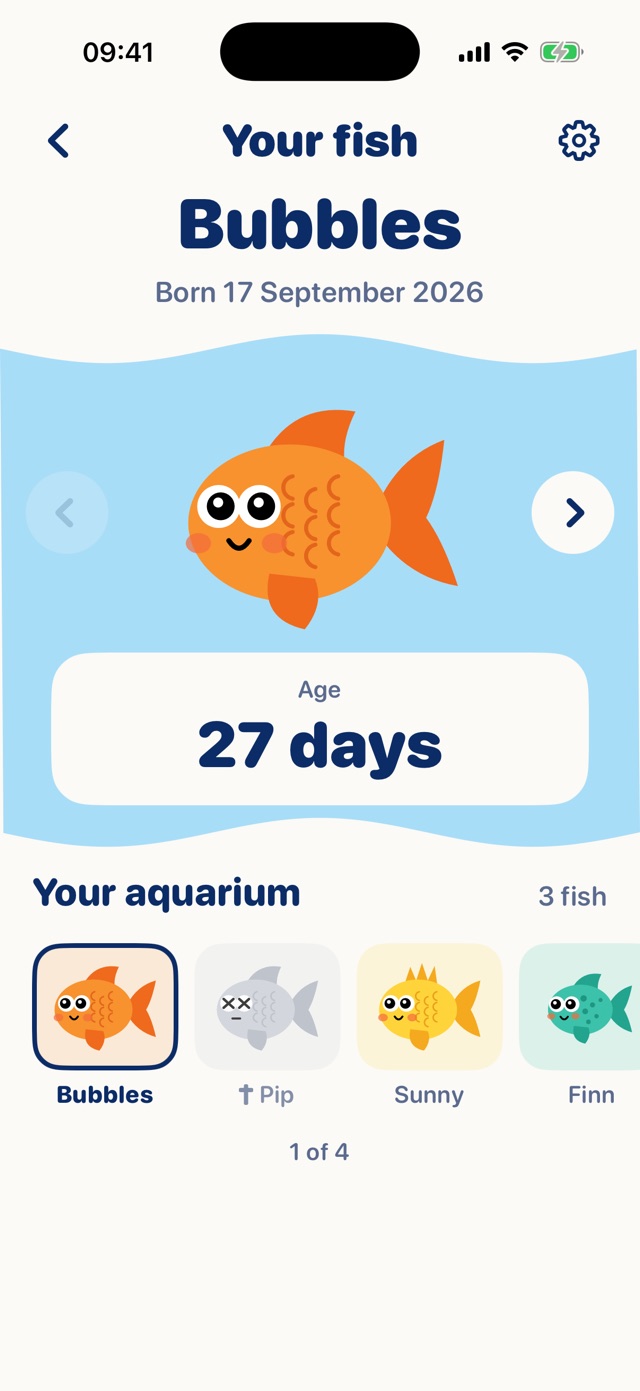
Keep the water up. Grow an aquarium.

Your first fish arrives the day you set up your tank. Look after it, and it gets company.

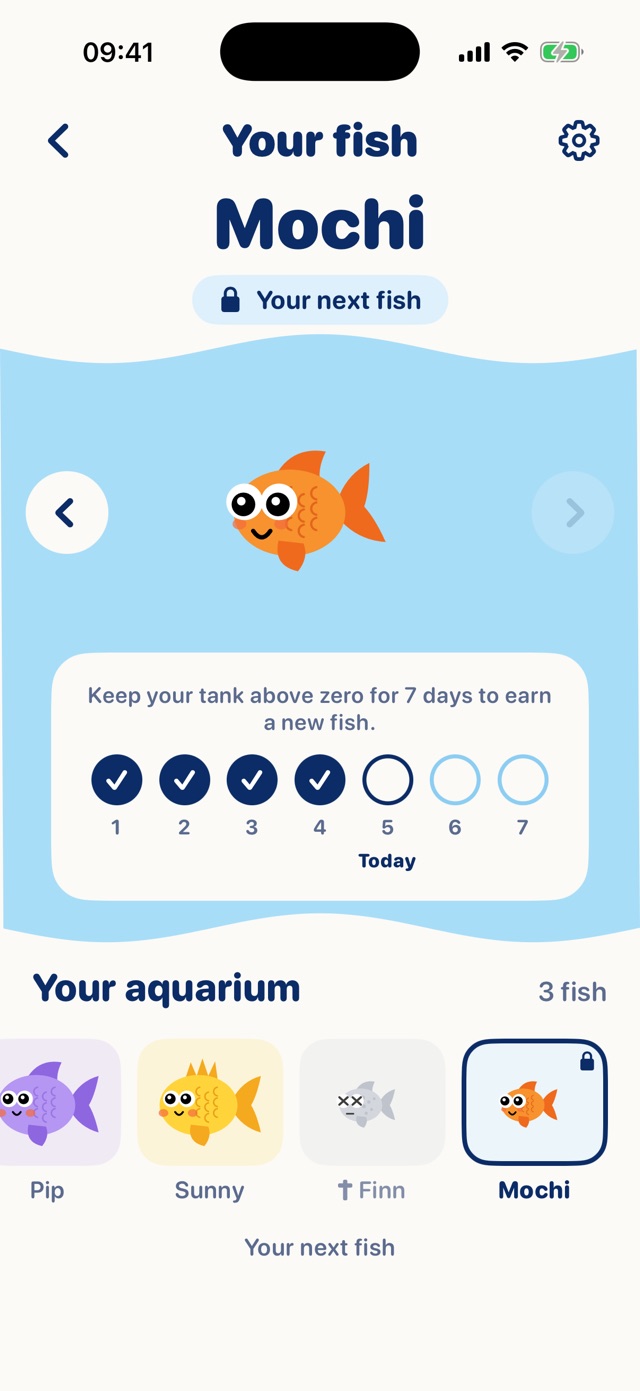
A new fish every 7 days

Keep your tank above zero for a week and a new fish moves in. Hit zero and the week starts over.

They grow up

Every fish starts as a big-eyed baby and grows bigger on Day 2, Day 5 and Day 12.

Up to 10 fish, each with a name

Fish you lose stay in the aquarium as a memorial, with how long they lived.

The math

What is your scrolling costing you?

Put a price on an hour of your time, then pick how much screen time you'd cut each day.

$per hour
5 min4 hr

You'd get back

$0

a year, at your rate

$0a month
0 hra year

In their words

What too much screen time feels like.

“I genuinely don't remember anything from this past month and I'm being serious.”
r/digitalminimalism · ▲1,830
“Ill see her put her knitting down to check Facebook and then spend 45 minutes on there.”
r/nosurf · ▲1,720
“There’s something about the infinite scroll that seeps deep into my cerebellum and locks me tf in.”
r/digitalminimalism · ▲887
“It requires you to have the motivation to not find the workarounds or bypass it.”
r/digitalminimalism · ▲887

And what the other side looks like.

“i sleep better. falling asleep used to take an hour of scrolling. now i read for 15 minutes and i'm out.”
r/nosurf · ▲189
“I started leaving my phone in another room for just 30 mins a day and it felt impossible at first, like withdrawal.”
r/nosurf · ▲32
“Phone daily screen time went from 8h to 2h in a month.”
r/digitalminimalism · ▲40
“I'm full of energy every day.”
r/digitalminimalism · ▲1,037

Real posts from r/nosurf and r/digitalminimalism about screen time in general, from the past year. Nobody quoted here has used or endorsed Tish the Fish.

FAQ

Questions

When can I get it?

Very soon. Tish the Fish is in its last round of testing before it goes on the App Store.

How much does it cost?

You'll see the price on the App Store page before you download.

I've tried app limits. Why would this work?

Limits and blockers fail because getting around them costs nothing. Tish the Fish still lets you unblock your apps, but it costs your fish. A number is easy to ignore. A fish looking at you isn't.

Is it iPhone only?

Yes, for now. Tish the Fish uses Apple's Screen Time features, which are only on iPhone.

Which apps drain the water?

You choose, in Apple's own Screen Time picker: single apps, whole categories like Social or Games, or everything.

How does focusing refill the tank?

Start a focus session from 5 minutes to 2 hours. Lock your phone or keep Tish the Fish open. When the timer ends, the water goes back up. One hour fills a full tank. If you leave for another app, the session doesn't count.

Does my fish really die?

Only if you unblock your apps while the tank is empty. Then one of your fish dies, and the others get 25% water back. Running low just makes them worried. If your last fish dies, a new one arrives at midnight.

How do I get more fish?

Keep your tank above zero for 7 days in a row and a new fish arrives at midnight. Your aquarium holds up to 10. You can see who's next, and how many days until they arrive.

What happens to my data?

There are no accounts. Your screen time is read through Apple's Screen Time system and stays on your iPhone, along with your tank and your fish.
Give your screen time a reason to drop.

Tish the Fish is almost here. Your first fish is waiting.

Coming soon to the App Store